Schedules
Configuration of schedules, i.e. the start times of the individual services in WEBCON.
All dates should be specified in the time zone of the database (UTC +01:00).
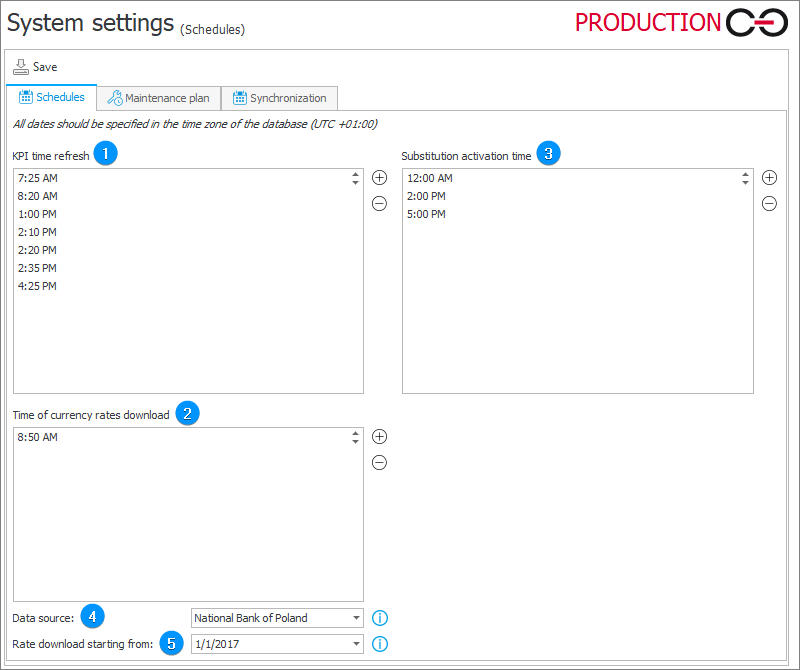
1. KPI time refresh
The times at which the service will activate generation of statistical analyses for individual steps. You can edit the values using the Add and Delete buttons.
2. Time of currency rates download
The times at which the service will update the table of exchange rates. You can edit the values using the Add and Delete buttons.
3. Substitution activation time
The times at which the service will start task delegation substitutions in WEBCON. You can edit the values using the Add and Delete buttons.
For more information on Task delegation substitutions, see THIS ARTICLE on our technical blog.
4. Data source
The data source to be used when downloading the currency exchange rates.
The National Bank of Poland option indicates the rates published to the official NBP API endpoint.
Note that exchange rate data sources will differ in data availability (some publish average prices, others only ask/bid prices etc.) and pricing system (direct/indirect quotation).
If there is no proxy, the synchronization with ECB is possible through port 443.
5. Rate download starting from
The date from which exchange rates are to be loaded.
For 01/01/2005 the rates will be loaded from the year 2005 up until the current day.
Maintenance plan
Define any number of time frames during which the workflow service will enter an idle mode.
During this time, maintenance can be easily performed without receiving a series of error messages regarding the service not working as intended.
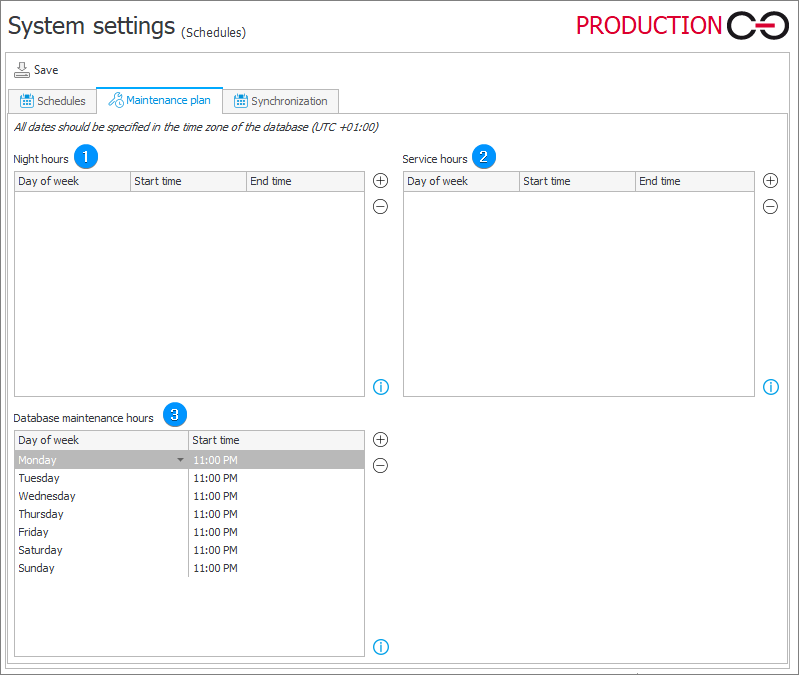
1. Night hours
To reduce the load of the server on which certain operations are performed, WEBCON makes it possible to run these operations at night. The configuration of the night hours allows you to create a flexible definition of hours, adjusted to the time when the server load is minimal.
The operations that can be performed during night time include:
- timer actions,
- asynchronous adding of text layers on attached scans (OCR).
Night hours are counted from the day and Start time specified, until the End time (which may be the following day, if the time period includes midnight).
Hours are defined using the 12-hour (AM/PM) clock.
The time frames are additive if they overlap.
When defining:
- Monday, 3:00 PM; 6:00 PM,
- Monday, 5:00 PM; 1:00 AM,
means that the Night hours period will last from Monday 3:00 PM until Tuesday 1:00 AM.
2. Service hours
This functionality has been put in place to define a time frame in which the workflow service goes into idle mode. This allows for planned maintenance, (for example: Database backup) without the service registering copious amounts of errors during its period of unavailability.
- Multiple time frames can be defined.
- A time frame may be defined with an accuracy to the minute,
- A time frame may be defined individually for each day of the week,
- Time frames are defined globally for all services configured in the system,
- By default, no Maintenance hours are defined (the service is continuously active).
3. Database maintenance hours
Time frames in which the service deletes outdated entries from the database, such as old logs, expired sessions and tokens, temporary files, and entries related to deleted objects. This keeps the database size under control and helps maintain system performance.
Data is cleaned in the order shown in the table below. In a single pass, no more than the number of entries given in the Entry limit column is deleted from a table.
| No. | Data | Table | Entry limit | Deletion condition |
|---|---|---|---|---|
| 1 | Workflow instance and application activities | SolrActivities | – | Workflow instance activities older than 12 months and application activities older than 6 months |
| 2 | Mobile app push notification queue | MobilePushNotificationsQueueItems | 100,000 | Maximum number of sending attempts exceeded and created more than 30 days ago |
| 3 | Service logs | AdminServiceLogs | 100,000 | Created more than 30 days ago |
| 4 | Workflow event logs | AdminWFEventLogs | 100,000 | Created more than 30 days ago |
| 5 | System usage logs | UsageLogs | 100,000 | Created more than 7 days ago |
| 6 | Trace events | AdminTraceEvents | 100,000 | Created more than 30 days ago |
| 7 | Trace sessions | AdminTraceSessions | 100,000 | Created more than 30 days ago |
| 8 | API logs | AdminApiLogs | 100,000 | Created more than 30 days ago |
| 9 | Sign-in session tickets | IdentitySessionTickets | 100,000 | Expired more than 1 day ago |
| 10 | Access tokens | IdentityAccessTokens | 100,000 | Expired more than 1 day ago |
| 11 | Refresh tokens | IdentityRefreshTokens | 100,000 | Expired more than 1 day ago |
| 12 | User sessions | Sessions | 100,000 | Expired more than 1 day ago |
| 13 | Email messages | WFMails | 100,000 | Sent status and older than 30 days |
| 14 | Temporary files | TemporaryFiles | 100,000 | Created more than 1 day ago |
| 15 | Generated Word documents | WFDocxGenerations | 100,000 | Created more than 30 days ago |
| 16 | Temporary binary data | BinaryTemporaryDatas | 100,000 | Updated more than 1 day ago |
| 17 | Folder file processing logs | AdminFileProcessingLogs | 100,000 | Created more than 30 days ago |
| 18 | Temporary attachments | WFAttachmentFiles | 1,000 | Created more than 1 day ago |
| 19 | Workflow instance checkouts | WFElementCheckouts | 100,000 | Checkout time older than 1 day |
| 20 | Plugin logs | AdminPluginLogs | 100,000 | Created more than 30 days ago |
| 21 | Completed timeout actions | WFElementTimeouts | 100,000 | Created more than 30 days ago – applies to actions with a finite repetition count that have either completed all executions or exceeded the limit of failed executions |
| 22 | User avatars | CacheOrganizationStructurePictures | 100,000 | The user has not existed in the system for at least 30 days |
| 23 | Locks of files edited via WebDAV | WebDavLocks | 100,000 | Lock expired more than 30 days ago |
| 24 | Workflow instance shares | SharedInstances | 100,000 | Sharing has expired or has been closed; a copy of the deleted entries is kept in the sharing history (HistorySharedInstances) |
| 25 | Tasks | ActiveTasks | 100,000 | Marked for deletion and not visible in the system |
| 26 | Change requests | ChangeRequest | 100,000 | Marked for deletion, not visible in the system, and created more than 30 days ago |
| 27 | Change request comments | ChangeRequestComment | 100,000 | Marked for deletion, not visible in the system, and created more than 30 days ago |
| 28 | To-do list items | ToDoItems | 100,000 | Related to deleted objects |
| 29 | Recurrent action executions | WFRecurrentActionsExecutions | 100,000 | Older than 12 months |
| 30 | Automation executions | AutomationSessionExecutions | 100,000 | Not connected with any workflow instance and older than 12 months |
| 31 | UDA logs | AdminUdaLogs | 100,000 | Created more than 60 days ago |
| 32 | Path transition history | PathTransitions | 100,000 | Created more than 60 days ago |
| 33 | Application presentation images | AppPresentationImages | 100,000 | Created more than 30 days ago |
| 34 | Application and process permissions | WFSecurities | 100,000 | Related to non-existing applications or processes |
| 35 | Configuration permissions | WFConfigurationSecurities | 100,000 | Related to non-existing applications, reports, dashboards, or starts |
| 36 | Performance indicator executions | PerformanceIndicatorExecutions | 100,000 | Related to non-existing performance indicators |
Tables are cleaned one at a time, using a queue. The maximum allowed number of entries is deleted from the selected table. If entries meeting the deletion conditions still remain in the table, it is placed at the end of the queue again and cleaned in a subsequent pass.
WEBCON statistics are also calculated and sent during database maintenance hours.
If cleanup is not completed before the end of the defined time frame, the remaining entries are deleted during the next database maintenance hours. If there is a large number of entries to delete, consider extending the time frame or defining additional time frames.
Synchronization
Allows you to set the time intervals at which service will perform the user list synchronization. You can edit the values using the Add and Delete buttons.
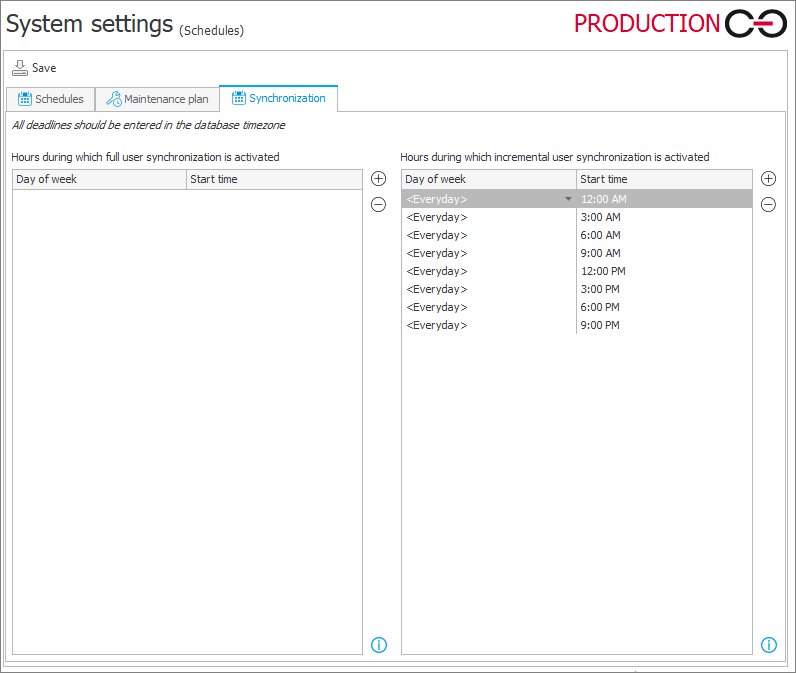
1. Hours during which full user synchronization is activated
All user and group data is loaded and updated, regardless of changes. A full synchronization may be much more time consuming than an incremental one. Therefore, full synchronizations are recommended in special cases only.
2. Hours during which incremental user synchronization is activated
User and group data is updated differentially. This means that only objects (users or groups) whose properties have changed since the last synchronization will be updated. Incremental synchronization also updates the state of modified and deleted objects. For performance reasons, this is the recommended default synchronization type.